
Factory / company
Water-Treatment Chemical Facility and Bulk Filling Tour
This facility tour shows VCYCLETECH storage, transfer, filling, packaged-container staging and dispatch areas for industrial water-treatment chemicals. The footage gives buyers a practical view of how material moves from tanks and connected pipework to filling positions, staged packages and loading activity. Use the tour to explore the product portfolio by treatment task, compare liquid or solid forms and identify suitable package formats. The next step is to share the application, water or process conditions, required product family or grade, quantity, package and destination for a focused product discussion and quotation.
Watch on YouTube Published
What this video shows
This facility tour shows VCYCLETECH's visible storage, transfer, filling, packaged-container staging and dispatch areas for industrial water-treatment chemicals. It helps buyers understand how bulk and packaged orders move through the site, then continue by treatment task: coagulation and flocculation, scale and corrosion control, microbial control or another application. Choose a product family and share the required grade, package, quantity and destination for a focused quotation.
From storage to filling and dispatch
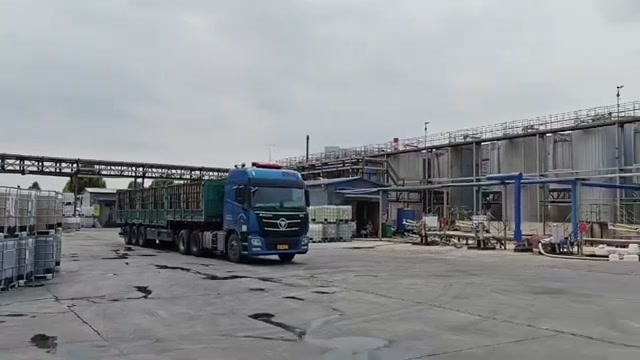
The video moves through outdoor and indoor operating areas rather than presenting a studio overview. Viewers can see storage vessels, connected pipework, transfer points, filling positions, staged packages and loading activity. Together, these scenes show the physical path from stored material to a packaged or bulk order prepared for dispatch.
Use that path to decide which format fits the intended operation. A product enquiry becomes more useful when it names the treatment task, preferred liquid or solid form, package, estimated quantity and destination.
Explore products by treatment task
Start with the plant problem rather than the facility itself. Buyers working on clarification can explore coagulants and flocculants; scale and corrosion programs can start with phosphonates; microbial-control enquiries can begin with biocides and algicides. Each category leads to individual product pages with uses, selection factors and related options.
If the application spans several treatment steps, describe the full water or process system so the enquiry can be routed across the relevant product families.
See product-specific shipment examples
For a chemical-specific view, continue to the PAAS shipment, solid ATMP loading or BKC shipment. These examples connect the broader facility workflow to named product families and package formats.
Turn the tour into a product enquiry
Send the industry and treatment objective, water or process conditions, current program and the product family of interest. Add the required form or grade when known, package, quantity, destination and timing. This gives the commercial and technical teams enough context to discuss relevant available products instead of returning a generic facility description.
For deeper company information, the quality page lists published management-system certificates, while the product and application pages remain the best starting point for chemical selection.
Product and process details
These fields summarize the product, process or shipment context shown in the video and linked catalog.
| Field | Value | Source |
|---|---|---|
| Video scope | Storage, transfer, filling, packaged containers and dispatch | Current video |
| Material path | Storage vessels, connected pipework, transfer points and filling positions | Current video |
| Package context | Packaged containers and staging areas are visible | Current video |
| Product coverage | General water-treatment chemical facility; no single SKU is assigned | Video entry |
| Next step | Choose a treatment task or product family and share package, quantity and destination | Product enquiry |
Choose a starting point from the facility tour
Connect the visible operating areas to the product family, form and package needed for the application.
| Starting point | What to explore | Useful enquiry detail |
|---|---|---|
| Storage and transfer | Liquid product handling | Application, grade or product family |
| Filling positions | Bulk or packaged supply format | Preferred package and quantity |
| Staged containers | Order configuration | Destination and receiving limits |
| Loading activity | Dispatch context | Timing and delivery location |
From treatment task to product enquiry
What should a facility-tour enquiry include?
A short application brief helps connect the general facility view to relevant products and package formats.
- Industry and treatment objective
- Water or process conditions and current program
- Product family, form or grade when known
- Preferred package and estimated quantity
- Destination and required timing
Common questions
What areas appear in the facility tour?
The footage includes storage and piping areas, transfer and filling positions, packaged containers, staging and dispatch activity.
Does the tour identify one exact product line?
The tour covers a general facility workflow; use the linked categories and product pages to continue with a specific chemical family.
Which product families can buyers explore next?
Start with coagulants and flocculants, phosphonates, biocides and disinfectants or the broader water-treatment chemical catalog.
What information helps identify a relevant grade?
Share the industry, water or process conditions, treatment objective, current program and any representative sample results.
How can a buyer request a quotation?
Name the application, product family or grade when known, package, quantity, destination and timing in the enquiry.